
Search Engine Optimization · 7 min read
Google crawled your service page and left it out. What should you check?
A crawl means Google visited the page. Start with the exact URL and compare its last crawl with the current version before you choose a fix.

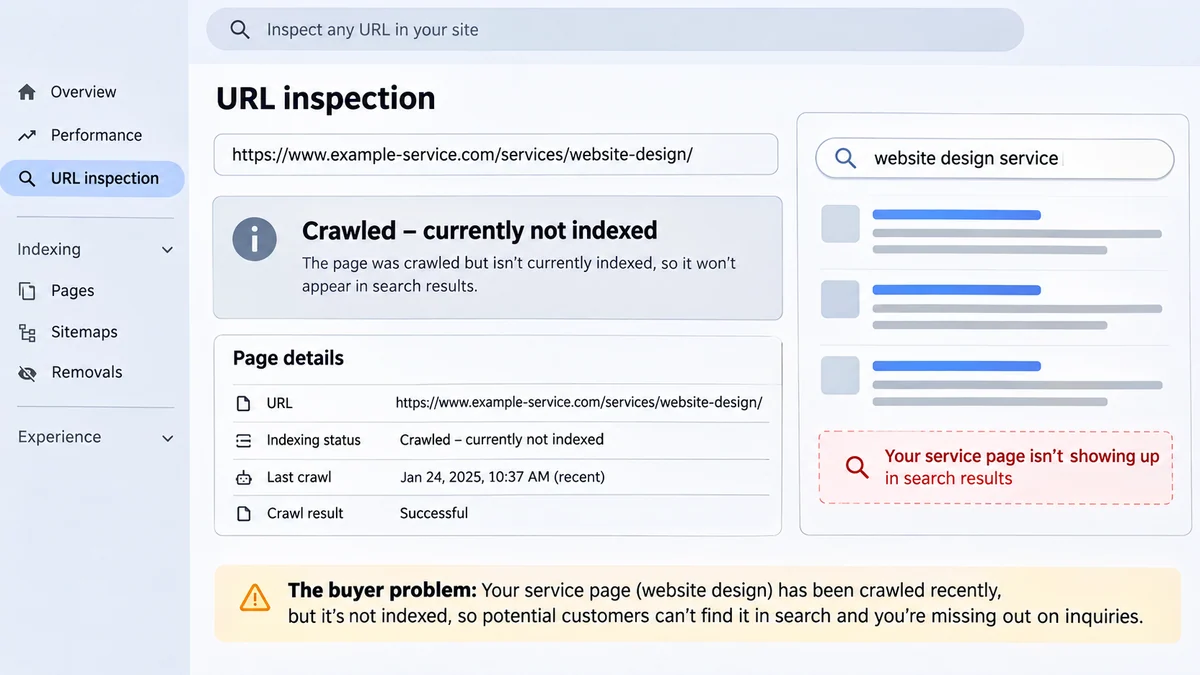
Start with the exact page and its last crawl
If a service page shows Crawled – currently not indexed, use URL Inspection on the exact page and compare Google's last known version with the page you serve today. Check whether the page is accessible and indexable now, whether a similar URL already represents the content, and whether the page helps a customer make a distinct decision. Google recommends inspecting important pages because the status alone does not identify a problem. Fix a specific issue if you find one, then watch what changes.
Say your business added a service page last month and people can already reach it from the menu. Search Console still lists it as unindexed. I first ask which URL the menu uses and which URL you checked. If you pasted a variation, a redirect, or the old address, you may be looking at a different page. The useful starting point is the final version that visitors land on and that you want represented in search.
Compare the recorded state with a live test
Open URL Inspection and read the indexing result for the exact address. Find the last crawl date, what the tool reports about availability, and any canonical details shown. Then inspect the current page using the live test. Google's help describes these as different views. The first reflects information from the indexing process. The second tests the page as it is available now and does not determine every factor used in indexing.
Record what changed after the last crawl. You may have removed a directive, restored a missing section, or changed the page's address. Write down the current result and the dates before making another change. If Google's last fetch happened before the change, the old report can describe a real problem that is already fixed on the site. A live test tells you what Google can access now, and the reported index state can take time to reflect a later evaluation.
Check what Google could actually reach
Google's technical requirements describe the basics of letting Googlebot access a working page that serves indexable content. Confirm the page opens without a sign-in and returns its expected content at the address you want. Ask your developer to check the response status, indexing directives in the page and headers, and any recent deployment changes. If you are examining rendered output, confirm it contains the service information, links, and other content the reader should see.
Check a few related pages at the same time. If several pages lost content or access after the same release, the issue may be in a shared template or setting. If the problem applies only to one service page, start with that page and its closest equivalents. My website redesign and migration checklist is useful if the URL changed during a redesign. Include the older URL when you ask someone to check the new one.
Look for a page Google already treats as the representative
Two URLs can serve almost the same page. A website might keep an old service address and a new one, or it might have several city pages with essentially the same copy. Google's canonicalization documentation describes how it chooses a representative URL from similar pages. Check the page's declared canonical and Google's selected canonical when available. Then compare those signals with the URLs used in menus, sitemaps, and redirects.
If two pages do the same job, consider whether one page can serve the reader more clearly. If both matter, identify the practical difference and make it visible. A page about repairing a product and a page about replacing it could each answer a different question. Two pages that use the same examples and promise the same work give readers little basis to choose. Ask your developer to review how any consolidation affects links and what people see when they arrive at the older address.
When I would ask for an indexing audit
If the page passes a live test and you still cannot explain the status, bring the inspection details, the final URL, and the pages that cover similar work. Tell me when it went live and whether you changed the site since. A Dallas business with service pages across several locations should include one indexed page and one unindexed page for comparison. I can review the technical signals and look at whether each page has a clear role for a customer.
Ask the person doing the audit to identify what they observed and what evidence would support a fix. An estimate may cover checking a single page, reviewing a template, or mapping how dozens of pages relate. My guide to the factors that affect SEO costs explains why the scope depends on the number of pages, the work needed, and who will make the changes.
If you work with a developer and a separate writer, agree who handles each finding. A redirect or template issue needs different access from a content revision. Give both people the same list of affected URLs and show them how you will verify the result.
Ask whether the page answers a real buying question
Put yourself in the position of a person deciding whether to call. Can they tell who the service is for, what problem it addresses, where you provide it, and what happens next? Give them the relevant process, preparation details, or limits that you can verify. Use service-area language only when it reflects where the business works and helps the reader make a decision. Keep the contact step and relevant links easy to find.
For example, a business serving Dallas–Fort Worth could have separate pages for a repair and a new installation if customers need different information for each. The repair page can explain the symptoms to describe and what a visit can determine. The installation page can describe measurements, options, and scheduling considerations. If the business offers the same service throughout the region and has no useful location-specific differences, a single well-organized page may be a better fit.
Review the body text where a customer actually reads it. A useful answer hidden only in an image or implied in a heading can be easy to miss. Use visible text for key decisions and link to the next relevant detail. Keep the facts specific to the service, especially where they affect whether someone should get an estimate.
See where a reader can reach the page on your site
Follow the same route you expect a new customer to take. Start at the home page or the service menu and try to reach the page without pasting its address. If the only path is through the sitemap, decide which relevant overview, related service, or project page should point to it. Give that link text a name a customer would recognize. A useful link helps somebody decide what to read next while making the intended address clear.
Compare the links you find with the address in the inspection result. On a business site with old city or service pages, links can remain scattered across earlier URL versions after a redesign. Ask the developer to identify which versions redirect, which still show content, and which page should receive new internal links. Keep a short list of the links you actually change. That lets you verify each one if the same pattern shows up later.
Check links on mobile too. A page might be in a desktop menu and difficult to find on a phone, or a button might take a visitor to a related page instead of the service they selected. Start with a few paths customers can realistically use. That review makes the site easier to use while giving you a concrete change to test.
Make one clear change and record it
If you find a problem, choose an action you can describe in one sentence. Restore the content visitors expect, align the canonical and internal links, consolidate two overlapping pages, or improve the page with specific information customers need. Keep a copy of the original findings and confirm the change on the live page. When several fixes happen at once, make a note of each so you can explain the new state to whoever checks it later.
Ask Google to recheck a changed URL using its normal tools when appropriate, but avoid treating the request as a promise of indexing. Record the date, then check the same URL again later. If the page appears in the index, use the Search Console performance data to see whether it is shown for relevant searches. My guide to checking whether SEO work is helping explains why I look at visibility and inquiries together after a change.
Bring the evidence before you authorize a rewrite
Send me the exact address, a screenshot of the inspection, the date of the latest change, and one similar page you believe is already indexed. Tell me whether the page belongs to a new service, a change in location coverage, or an existing set of pages. If you have a site map or release notes, bring those too. We can use that information to decide where to look before asking anyone to rewrite or rebuild the page.
The result I want from the first review is a short set of observations you can verify. It should name the URL the business wants people to use, describe what Google last saw and what is live now, and identify any overlap with another page. If the review finds something to change, agree on who will do it and how you will check the next result. That gives you a decision you can act on even when there is no immediate change in the report.
Questions people ask me
Does Crawled – currently not indexed mean my site was penalized?
The status tells you that Google crawled the URL and has not indexed it. Use inspection and related pages to check what applies to this URL before drawing a conclusion about the whole site.
Will a successful live test get the page indexed?
A live test checks whether the page can be accessed and evaluates certain current conditions. Google says it does not predict every indexing decision.
Should I request indexing again every day?
Repeated requests do not diagnose why the page is missing. Inspect the page and document any meaningful correction before asking Google to recheck it.
Do I need separate pages for every suburb I serve?
Only create separate pages where they have a useful, distinct role for customers and reflect the business accurately. Compare similar pages before expanding a set of location URLs.
Sources
Keep reading
More from Mantas
- Several locations, one brand: how to do local SEO so every branch shows up on Google
- Your business is missing from Google Maps for near me searches: what to check first
- More Google reviews, no shortcuts: how a local business asks the right way
- You pay for SEO every month: how to tell whether it is actually working
Running a business
- Business Consultant · Armando
- Business Broker · Michael
- Franchise Consultant · Avinash
- Recruiting and Staffing Services · Chase
- Information Technology · Anthony
- Computer Software · Brandon


