
Business Phone & Telecom · 7 min read
How should your business phone route calls after closing?
Decide who can help after hours, what they can handle, and what callers should hear if nobody picks up.

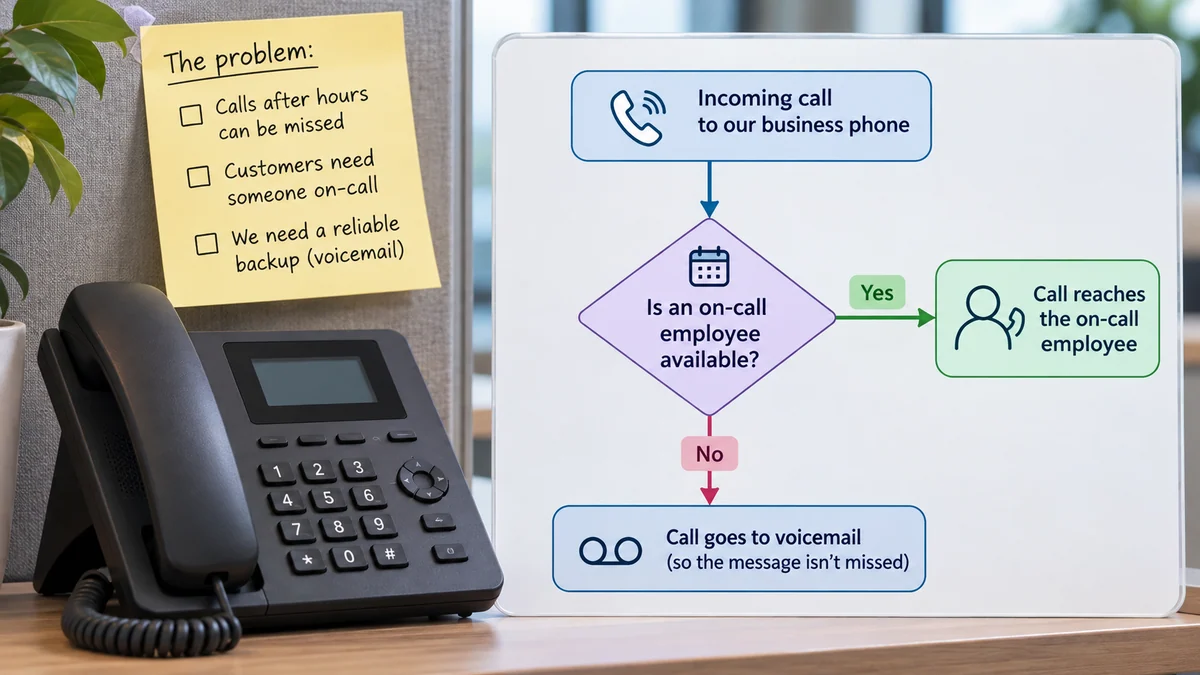
Start by promising only what you can staff
Route routine calls to a mailbox or other channel with a named owner and a clear response window. Send urgent business calls to a live person only when somebody is scheduled to answer, and set a fallback for missed calls. Test the flow from an outside number before giving customers the instructions.
At Cleod9 Voice in Arlington, we help businesses with cloud phones. I start after-hours conversations by asking what the business can actually do when the office is closed. A service company might have someone available for a defined kind of problem. An office that reopens in the morning may give callers better service by describing how and when it will return a message.
Draw the route for the calls you actually receive
Take a sheet of paper and put your main number at the top. List the reasons people call after closing. Think about existing customers who need support, people trying to make appointments, vendors and callers who only need your hours. Some might need a different number from the one you currently give them. Decide which callers should reach the same place.
Write the route for each group from greeting to answer. You might send routine requests to a shared voicemail and a defined support issue to the on-call employee. Think about what happens when the caller presses nothing or presses the wrong option. A simple direction to repeat or leave a message can get them back on track.
Our guide to a yearly business phone system checkup covers other ways to review a call flow after the office changes. Keep the plan somewhere the person covering phones can find it.
Say what is closed and what happens next
A caller usually needs a few facts in the opening greeting. Tell them the office is closed, when normal calls are handled, and what to do now. If an urgent path is only for certain problems, describe the kinds of issues it covers in language a customer uses. A sentence about why the option exists can prevent routine requests from going to the on-call employee.
Have someone outside the team listen to the recording. Ask them when they would expect a reply and which option they would use. If they have to remember several unfamiliar departments, cut the menu down. If you have no after-hours team, say when someone checks messages. Keep customer instructions aligned with the support hours shown in other places.
Think about privacy when you ask callers to leave a message. Give them the least information you need to return the call and ask them to use an approved channel for confidential material. Ask your compliance adviser to review the approach if your business handles sensitive client or patient information.
Name the first person and the fallback
Assign each shift to a person who can recognize and return a business call. Write down who answers if that person is already on a call or unavailable. If the fallback is voicemail, give the mailbox an owner and decide what will alert that person. Ask the provider what the caller hears if both the initial and backup routes fail to reach someone.
If the route goes to a mobile phone, check whether the destination recognizes a business call and whether personal voicemail can answer it. Ask what number the recipient can use for a callback and how they would hand the issue to the next shift. See our guide to desk phones, softphones and mobile apps for device considerations.
For a Dallas–Fort Worth office with calls going to the wrong people after closing, bring us a few real examples and your current hours. We can discuss what to change in the call flow and what to test before callers use it.
Give holiday and split schedules their own check
Write out the ordinary week before entering it. Note early closures, lunch coverage, time zones and weekends. If locations use different hours, decide whether callers should choose a location first or whether each number should have its own greeting. Configure and review the route against the schedule each team actually follows.
Microsoft’s auto attendant documentation illustrates why a time zone and separate off-hours or holiday flows matter. Ask your own provider which options apply and what takes precedence when schedules overlap. For example, a holiday can occur on a normal working day, and a short staff closure might begin before the usual off-hours rule. Test that the greeting matches the route active at that time.
Name a person who can make an authorized change for a temporary closure. Keep a record of when it starts and ends and who confirms it was removed. A one-time greeting can stay in place by accident if nobody owns the return to ordinary hours.
Plan for the route when a device or connection is down
Ask the provider what the system does if the office loses internet or the intended recipient is unreachable. Decide how a call should move if the on-call person’s phone has no coverage. See our guide to keeping business phones answered during a local outage if you rely on office devices or internet service. Test the fallback for the specific failure you are planning around.
Keep an authorized contact list separate from the phone system. If the main administrative screen is unavailable to the office, someone still needs the provider’s support contact, the current call destinations and a way to reach the backup. Include who can approve a change and how the support team will verify it. Review the list when staff rotate.
Give the morning team a handoff
A clear after-hours route can still leave the morning team guessing what happened. Agree on where the on-call person records a callback and which messages need to move to someone else. Give the person opening the office a short list of what to check first. Where possible, use a shared location so the team can see which issues have an owner before they start returning calls.
Think about how to handle a caller who tries two different paths. Someone might leave a routine message and then call back through the urgent menu. If the two records stay separate, two employees can respond without knowing the other is working on it. A single record of ownership and the last contact makes that easier to avoid. Confirm how long the team needs to keep those notes and who can access them. The call flow gets a person to the right place. The handoff gives that person a way to make sure the customer receives an answer.
Test the caller and recipient sides
Make a test call from outside the organization and try each menu option. Listen to the greeting, wait through the ring and leave a test message where appropriate. Check that the person who should get it sees the notification, can open the message and knows how to make an approved return call. Repeat the test with the first destination unavailable to check the backup path.
Test the difference between open and closed hours and check a temporary schedule if the provider offers a safe way to test it. Save what should happen and what you actually heard. Include the number dialed, time, route and who was expected to answer. If you have published alternate numbers over time, call those too. Some may reach a different route than the number on the new plan.
Ask a person who did not design the flow to call it. If they cannot tell which option applies, revise the words and repeat the test. You will learn more from that call than from looking at the menu on screen.
Review real calls after the change
During the first week of use, ask the people handling calls what arrived and what still came through incorrectly. A short review can identify callers who chose the urgent path for routine work or left a message with too little information to return. Decide whether the greeting, the routing or the internal process needs adjustment.
Where reporting is available, compare call outcomes to the staffing schedule. If callers are abandoning a path while it rings, check whether the same thing happens in a test and whether the backup starts soon enough to be useful. If the team misses messages even though the route works, fix how the mailbox is assigned and checked. Ask the provider to explain reporting terms so you know what they count.
Document any change and tell the people answering calls before it takes effect. Small changes can create a confusing day for the next shift if someone hears a greeting they did not expect.
Bring us the call path you want to keep
List the main number, open hours, reasons people call and who can actually help after hours. Include any extension, answering service or secondary number you need to retain. We can discuss whether the system you have supports that flow and what you would need to change. If you are evaluating providers, ask to hear a working example, including an unanswered call.
Before putting the new instructions on your website or in a customer email, give them to the people who will take the calls. Ask them to test the path and confirm the process for updates. You should be able to explain the entire arrangement in plain words and show how a caller reaches either a responsible person or a monitored place to leave a message.
Questions people ask me
Should after-hours calls go to voicemail or a person?
Offer a live path where you have a defined service and somebody assigned to respond. Give callers with routine requests a clear way to leave a message and know when it will be reviewed.
What happens if the on-call employee misses the call?
Define a backup or an approved mailbox with a responsible owner. Test the no-answer, busy and unavailable cases before relying on the route.
Can holidays use a different greeting?
Some systems support separate holiday schedules. Ask your provider how exceptions are applied and test the actual dates and call destinations.
Should we forward calls to a personal phone?
Discuss how the system will route and identify the call, whether personal voicemail can pick up, and what callers see on a return call. Follow your company’s privacy and device policies.
Sources
Keep reading
More from Beau
- Your phone provider signed a HIPAA business associate agreement. Is the practice covered now?
- Recording business calls in Texas: what the consent rule allows and what to tell callers
- Why your business calls show up as Spam Likely, and how to fix it
- Your staff text clients from their own phones: what that costs you, and the fix
Running a business
- Business Consultant · Armando
- Business Broker · Michael
- Franchise Consultant · Avinash
- Recruiting and Staffing Services · Chase
- Information Technology · Anthony
- Computer Software · Brandon


