
Computer Software · 7 min read
When a CRM-to-ERP retry creates a second order, what should you fix?
An order can reach the ERP even when the CRM sees a timeout. Learn what a safe retry should do, where to look for the original order and how to test a connector before you buy it.

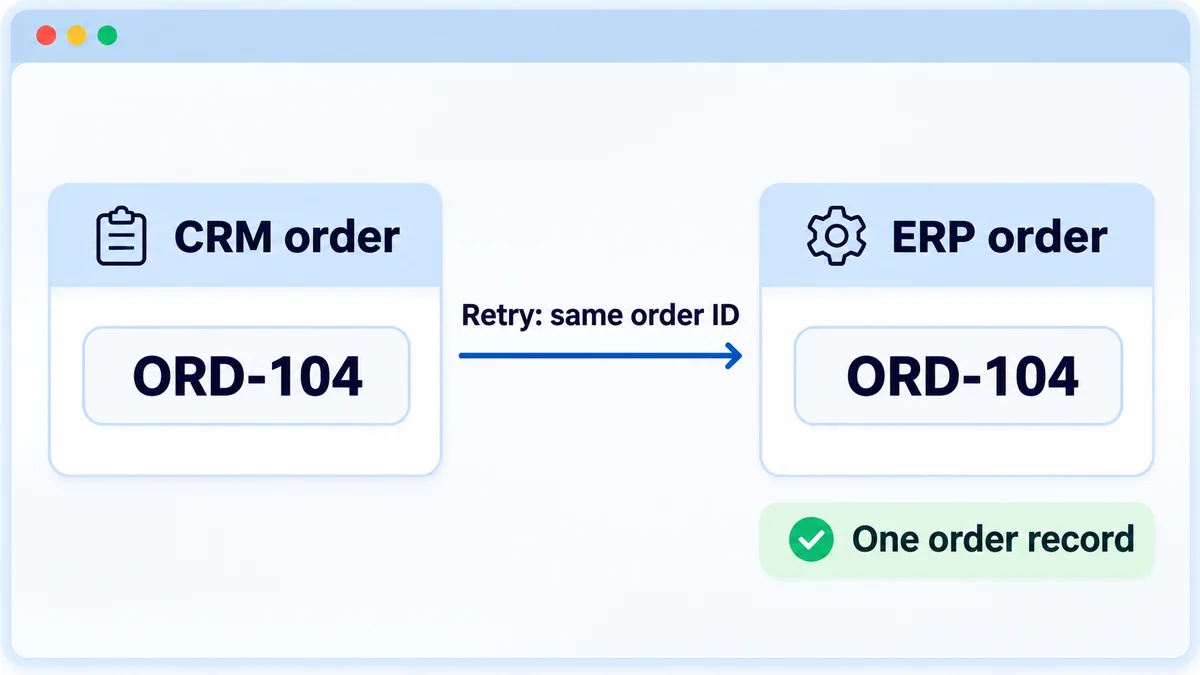
Give the order an identity that survives a retry
Send a stable source order ID with every attempt to create the order, and make the ERP or the receiving integration use it to prevent a second creation. If the CRM times out, the integration should be able to find the existing ERP record or safely submit the same request again. Give staff a way to see which outcome occurred before they take any manual action.
Imagine a Dallas distributor where sales submits an order from a customer relationship management system, or CRM, and the enterprise resource planning system, or ERP, takes over fulfillment. Sales sees an error and resends it. The warehouse sees duplicate pick requests because the first attempt actually created the order, even though its confirmation never made it back. The difference between a safe retry and another sale is whether the receiver recognizes that both attempts concern the same order.
At Aezion, we work on custom software and system integrations. Our published Universal Air Conditioner project describes connecting order and shipping workflows to a backend ERP. The scenarios below are illustrative. You can use them to evaluate a new connector or explain a duplicate that already happened in your own systems.
Trace one duplicate before discussing a replacement
Pick a reported duplicate and follow it from the sales screen to the warehouse or billing queue. Compare the CRM order ID, the ERP's internal order numbers and the source ID stored on each ERP record, if one is stored. Ask whoever runs the integration for the send time, response and retry history for that order. Keep the identifiers and relevant timestamps in one place so people from both teams can review the same sequence.
If the same CRM order points to two ERP orders, check whether the second came from a retry, a manual reentry or a separate import. The details matter. A reliable connector cannot recognize a manual order keyed straight into the ERP if that order carries no source reference. If there is only one ERP order but two pick requests, the repeat occurred later in the process and a change to CRM order creation alone will leave it in place.
Have the owner of fulfillment or billing review duplicates that already reached their teams. A record may have a shipment, invoice or another downstream action attached. Decide how to resolve those records with the people responsible for them. You can start the technical review from a sanitized trace that preserves the sequence without sharing names, addresses, payment information or customer notes.
Decide who creates, changes and cancels orders
Start with the moment an order is ready to send. A deal marked won could be an instruction to create an order, or it could still need an account check or internal approval. Write down the exact event that authorizes creation and who is allowed to trigger it. If the same business uses a web store or a batch import, identify where those orders originate so their IDs cannot collide with the CRM's.
Agree on the fields the receiving system owns. Sales might own the delivery instructions before submission while the ERP owns allocation and shipment status after it accepts the order. Make a rule for what happens if sales requests a change after a warehouse worker starts picking. A documented handoff gives the vendor a concrete change rule and gives your staff a place to check when a customer asks what happened.
Give legitimate changes their own operation or version. A cancellation and a creation can share a source order ID while representing different instructions. If a second creation for the same ID arrives with a different quantity, surface it as a conflict or handle it through the agreed update rule. Our guide to fixing siloed reporting data covers the related problem of agreeing which system owns a value used in reports.
Ask where the second creation is actually prevented
The term you may hear from a developer is idempotency. Here it means repeating the same creation request leaves you with the same order, even if the systems make several attempts to deliver the request. Microsoft's Azure Architecture Center describes keeping a stable identifier and recording a successful operation so a later delivery can be recognized. The exact implementation depends on what the receiving ERP supports.
Ask the vendor to show how the receiver prevents duplicate creation if two copies arrive together. A lookup followed by an ordinary create can leave an opening: each request can look before either one writes. An ERP feature that enforces a unique external reference, or a supported create-or-retrieve operation that guarantees uniqueness, can address that race. If the receiving system cannot do either, ask how the integration will check ambiguous outcomes without asking staff to guess.
If you are evaluating a connector for a Frisco or Dallas–Fort Worth team, tell me which applications are involved and what people do when a submission appears to fail. We can discuss what the products support, where a customization would be needed, and which outcomes your team should require the vendor to demonstrate before you commit.
Decide what the sales desk should see when the answer is unknown
A temporary network problem and a rejected order need different responses. If the ERP is briefly unreachable, the integration may retry with the original identifier. If the ERP rejects the item code because the item is missing, repeated attempts will keep failing until someone corrects the mapping. Ask for messages that let a person tell the difference and find the owner who can resolve it.
The most important state is the one nobody wants to name: the order was sent, but its outcome is unknown. Microsoft documents this issue in its guidance on timeouts and duplicate processing. Show the sales rep that the submission is awaiting confirmation and give the integration team a way to reconcile it by source ID. If the outcome stays unknown and a customer is waiting, staff need a documented route to support before they key a new order.
When the ERP confirms the order, show its number back in the CRM. When there is a genuine error, show what can be corrected and who owns the next action. Put exceptions that need manual attention in a view the responsible team can monitor. Decide who checks it on a busy day and how to escalate an order that is sitting there close to its shipping deadline.
Ask for a demo that includes a lost confirmation
Use a sandbox and sample orders to test the entire journey. Start with a routine submission, then arrange for the order to reach the ERP while the confirmation fails to reach the CRM. Have the vendor send the original request again. Verify that the receiving system still has one order and that the CRM eventually shows the correct ERP reference.
Include someone from shipping or billing. Ask them to check the effects they are responsible for, because a single ERP order number does not prove the system avoided sending another pick request or invoice instruction. Our guide to user acceptance testing before launch explains how to capture the expected result, who should run the case and who should approve it.
Test what your people will actually do next. Have an operator handle an invalid item code, a late cancellation and a submission with the same source ID but different contents. Try repeated submissions close together if people or background jobs can do that in your workflow. Record what the sales rep sees, what the ERP stores and what the next department receives in each case.
Once the vendor demonstrates the basic cases, ask a member of your team to resolve a failed test order without the vendor at the keyboard. If your operator can find the order, work out what happened and explain the status to sales, the handoff is ready for the next rehearsal. If the operator still needs a developer to read the logs, put that work in the scope.
Compare what the quotes cover after the data is mapped
A standard connector may be sufficient if it supports stable order references, the operations you need and an exception history your team can use. Custom work enters the conversation when the ERP interface cannot enforce your order rules, there are multiple input channels, or a third system needs to coordinate fulfillment. Ask each vendor to price the same flow and identify what the existing products can already handle.
The scope usually includes more than mapping the CRM customer and item fields to the ERP. Check for licensing assumptions, a test environment, an operator view, remediation of any existing duplicates, and someone to support the connector when either application changes. Ask for the cost of a narrow first release if you can start with a well-defined order type. For more context, see our guide to the factors that drive custom software cost.
Ask who owns the retry and exception history after launch. A good handoff should leave your team with a way to investigate problems without waiting for the original developer to return. Our guide to maintaining custom software after launch explains what to settle about ongoing support while you are comparing proposals.
Bring a sample order and describe what went wrong
If you want to discuss an order integration with us, start with the CRM and ERP names, how sales currently submits an order, and where staff see the resulting ERP number. Bring an anonymized example if you have one. Let us know whether the issue stopped at a duplicate record or reached shipping or billing, so we can discuss the right boundary for an investigation.
For a new integration, bring the workflow you want to automate and the exception your staff handles most often. We can talk through whether a standard connector can handle that case, what needs to be tested, and which responsibilities should appear in the proposal.
Questions people ask me
Does a timeout mean the ERP never received the order?
A timeout means the sender did not receive a response in time. Search for the order by its original source reference or let the integration reconcile it before anyone creates a replacement.
Can we use the customer purchase order number to prevent duplicates?
Use it only if the business rules make that number unique for the operation you are trying to protect. Different customers can use the same reference, and a customer can sometimes reuse a reference, so a stable source-system order ID is often a better basis.
Can an integration retry without calling the ERP twice?
Some connectors can query for an existing order and return its reference. A safely repeatable write may still call the ERP more than once, but the receiving system should preserve the same business result.
Will a new connector remove duplicate ERP orders we already have?
Preventing future duplicates and resolving existing records require different work. Have the people who own fulfillment and billing review what each record triggered before deciding what to reverse or close.
Sources
Keep reading
More from Brandon
- A dedicated offshore team or a fixed software project: which fits the work you have?
- Company data in ChatGPT or a private AI setup: how to decide what goes where
- Who owns the source code when you hire a company to build custom software?
- The demo worked. How do we know the software is ready to launch?
Running a business
- Business Consultant · Armando
- Business Broker · Michael
- Franchise Consultant · Avinash
- Recruiting and Staffing Services · Chase
- Information Technology · Anthony
- Business Phone & Telecom · Beau


