
Security Systems · 7 min read
An employee left with a key or fob. Do you have to change the locks?
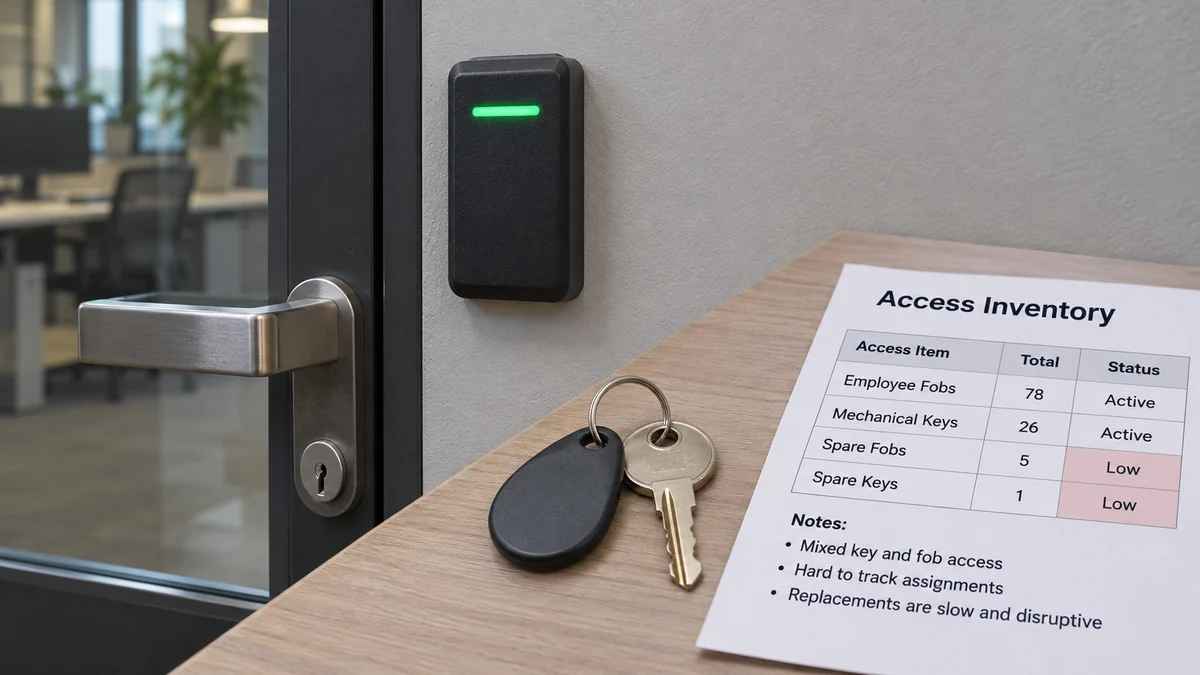
A key on the desk tells you what came back. A door-by-door inventory tells you what still needs to be removed.

Start with every way the person could enter
If a former employee used an individually assigned fob or mobile credential, ask the administrator to deactivate it and confirm the change reached the doors it controlled. If the person had a mechanical key that could still open a door, you need a separate decision about whether to rekey that lock. Include alarm credentials, shared codes, landlord-controlled entrances, and after-hours access in the same review. I check each route separately because one person may have several ways into the same space.
Think about a shop that collects a fob on the last shift. The front reader now rejects that fob, but the employee also had a key to the rear entrance for deliveries and used a shared code to disarm the alarm. The fob decision answers only one part of the question. Ask who distributed each item, who is able to change it, and what evidence will tell you that the change took effect. For a Dallas business in a shared building, the property manager may control the lobby, elevator, or parking garage while the tenant controls its own suite.
Turn the problem into a door list
Walk through the entrances with the person who manages the space. Start at the point where staff enter from outside and follow them to any area that has a separate lock. Include gates, storage rooms, and a shared loading entrance if the departing person could enter there. Write down who owns the hardware, which credential opens it, and who can make a change. Store this list somewhere appropriate for security records. There is no need to include access codes on the list.
Then check how credentials were recorded. If a fob was issued to a named employee and nobody else uses it, removal should be a distinct administrative action. If the system shows a group name for a credential, find out whether it represents a permission group or a fob people actually share. That difference affects who may lose access when you deactivate it. For other ways shared credentials can complicate an incident, see my guide to small-business security mistakes.
Decide which hardware needs a locksmith
A mechanical key works as long as it fits a cylinder. If you have an unreturned copy or cannot tell who has copies, ask a locksmith or the building manager what rekeying would affect. A building might use one key across multiple doors, and the tenant may have authority over only part of the system. Work through the door list before ordering a change. You want to know which doors will use new keys and who needs them to open or close on the next shift.
Returned keys still belong on the inventory. Compare what came back with what was issued, and check whether keys that were meant for temporary use have a documented return. Ask who keeps an authorized emergency copy and which staff need to be told about the change. A keypad or reader on one door does not remove the need to manage mechanical overrides. When I look at an existing access system, I ask who handles the override and whether a separate key register is available.
Confirm the change on the actual doors
After an administrator removes a credential, ask for the time and the name or identifier of the entry that was removed. Have the administrator confirm which doors and systems received the update. If a controller is offline or the building owner administers an entrance, you may need help from the provider or owner to verify the change. Arrange any test with an authorized administrator. A written record of verification lets the closing manager know what has been done and who to call if a problem turns up.
At the same time, check that the people still working can get in when expected. The reception staff may be there during the day while someone else opens before normal hours. The cleaning service may come when nobody is there to let them in. Test the paths that matter with a current authorized credential. Ask who should be contacted if one of those paths fails. If the access equipment has recurring trouble or depends on old accounts, my guide to evaluating an older alarm system can help you prepare for a service call.
Ask for help when nobody owns the full picture
I would ask for an assessment if the person who left was the only system administrator, if you cannot identify the credential assigned to them, or if the same code was used by several people. A change to shared access can leave staff unable to enter, especially if nobody records who uses each route. Share which doors and alarm functions you control and which belong to a property manager. In Dallas–Fort Worth, we can discuss the access control and monitored alarm work within our scope and identify where a locksmith or property manager needs to be involved.
If you are choosing a replacement provider, ask the same company to show you who can manage users and what happens when a system stops communicating. Find out how you would get a list of current access holders and what support is available when your administrator changes. My questions to ask before signing with an alarm company cover more of the contract and handoff questions I would settle before buying.
Set up access that follows the job
Start with people who perform a similar job and the doors they need during their normal hours. Give each person a separately identifiable credential where the system supports it, even if they all share the same permissions. That gives an administrator a way to remove one person without taking the whole group offline. Decide who approves new access, who actually issues it, and what must happen when the role changes. Add a second authorized administrator or a documented backup so routine changes do not depend on one person being available.
For vendors, ask whether temporary access can be limited to the agreed doors and expire when the work ends. The CISA public venue credentialing guide gives examples of temporary credentials that expire and sign-in processes for contractors. A small office can apply that idea to a short repair job without adopting every practice meant for a public venue. Give the vendor a contact who can help if the work runs past the scheduled window. Ask the manager to check that temporary access is removed after the job if expiry is handled manually.
If an employee moves from one role to another, I use the same review. A manager who hands off opening duties may still need daytime access to the suite and no longer need the loading entrance before business hours. Treat the change as a removal and an assignment with a record of both. It is easier to check who should have access by comparing what is active with what each person does now than by trying to remember every time their job changed.
Compare the cost of rekeying with the cost of better administration
For a mechanical change, the scope usually depends on how many cylinders are involved, the key system, and who needs new copies. For an electronic project, ask for the cost by door, the reader and controller involved, who supplies or maintains the credentials, and any recurring fees. Ask how the system ties in with your alarm and what happens if you change service providers later. Before buying, check who owns the administration account and whether you can export a useful credential inventory.
Have the vendor show you the process on an ordinary account. Ask them to create a test employee, assign appropriate doors and hours, and then remove the person. Find out whether the dashboard shows which controller received the change and whether an administrator can tell when a test is complete. For an existing system, a training session and an accurate credential inventory may solve the immediate problem. If you manage several entrances or have frequent staff turnover, ask what parts of the current setup can be reused.
Ask what ongoing maintenance the price covers. A clear estimate describes who replaces failed equipment, how updates are handled, and whether help with user changes is included. For a shared entrance, make sure both the building owner and the tenant know who pays for service before the equipment is ordered.
Bring your inventory and one recent example
If a staff change is coming up, bring the door list, the roles that use each entrance, and the people authorized to manage changes. Describe what happened during the last departure, including whether any key, fob, or code was unaccounted for. Use general descriptions in an initial request. Keep credentials, pin codes, and detailed entry records in the appropriate secure channel. I can help you decide what to check on the installed system before you request new hardware.
After that conversation, write an offboarding step for whoever handles departures. It should name who takes the keys, who removes electronic access, who contacts the landlord, and who checks the result. CISA's federal separation checklist uses assigned actions and confirmation for personnel departures. Your own checklist can be smaller and still assign the work clearly. Bring a copy to a service visit so the technician can explain which parts your staff can manage and where support will be needed.
Set a date for someone to compare the active credential list with current staff and vendors after the transition.
Questions people ask me
Does collecting a fob automatically remove its access?
Collecting it reduces the chance it will be used again, and the credential may still be active in the system. Have the authorized administrator remove it and confirm the change.
Should I replace the whole lock if a key is missing?
A locksmith can often evaluate whether a rekey is sufficient for the hardware. For a leased space, ask the property manager which locks or key systems they control.
Can a temporary contractor badge expire on its own?
Some systems support scheduled expiration or restricted time windows. Ask your provider to demonstrate what happens after expiration on the doors the badge can access.
Does turning off a door fob also remove the alarm code?
That depends on whether the access and alarm functions share the same user record. Ask the provider to identify each credential and confirm removal in each system that applies.
Sources
Keep reading
More from Joe
- Smart locks, lights and thermostat: run them through the alarm system or separate apps?
- Can your alarm warn you about a frozen pipe or a leak while you are away?
- Can someone else watch your cameras? How to keep a home camera system from being hacked
- Your old alarm still beeps, but does it still call anyone? Signs it needs replacing
Your home
- Roofing · Chris
- Gutters · Jordan
- Painter · Andrey
- Power Washing · Doug
- Foundation & Concrete · TJ
- Drywall Repair · John


